
The SOP Playbook: Documentation That Actually Gets Used
A Markinly operating guide for CEOs, business owners and the managers who run their teams.

If your business would stall the week a key person is off sick, your processes live in people, not in the business. This playbook shows you how to move them out of heads and into a system your team actually uses — without a six-month documentation project that ends in a shared drive nobody opens.
Who this is for
This guide is written for businesses turning over roughly $1M–$20M (£1M–£15M), with 10 to 150 people, where:
-
The CEO is still the escalation point for decisions a manager should own.
-
Quality depends on who does the work, not how the work is done.
-
Onboarding a new hire takes months and leans on whoever has time to shadow them.
-
You have tried documenting processes before, and it didn’t stick.
How to read it
The guide has two reading paths. Each takes under 30 minutes.
| You are | Read these sections | You’ll leave with |
|---|---|---|
| CEO or business owner | Executive summary, The business case, Diagnostic, Who does what, Where this usually breaks | A decision: whether to fund this, who owns it, and what you’ll measure |
| Operations lead or manager | The five formats, Writing SOPs, Worked example, Embed-and-audit loop, Adoption mechanics, 90-day plan | A working method and a first five SOPs scoped for your team |
| Process owner | Writing SOPs, Worked example, Ownership, Appendix templates | A template and a standard to write to |
Every section opens with its point in one sentence. If that sentence is all you need, move on.
Executive summary
SOPs fail because nobody owns them after they’re written. Fix the ownership and the loop, and the writing becomes the easy part.
The problem. Most growing businesses run on tribal knowledge. It works at 10 people because everyone sits near the person who knows. Past 20–30 people, it becomes a tax: on the CEO’s time, on onboarding, on quality, and on the valuation of the business itself. A buyer or investor pays less for a company that only works when its founding team is in the room.
Why previous attempts failed. Documentation projects are usually treated as a one-off writing exercise. Someone is told to “get the processes down”, produces a folder of long Word documents, and the library is out of date within a quarter. The failure is structural, not a matter of effort.
The system. Documentation that gets used has four properties:
-
The right format — a checklist, decision tree, narrative, playbook or video, matched to the task.
-
The right location — inside the tool where the work happens, one click from the task.
-
A named owner — one person accountable for each document’s accuracy, reviewed quarterly.
-
A loop — onboarding, the weekly meeting rhythm and a quarterly audit, which together keep it alive.
What it takes. A realistic first phase is 90 days: five priority SOPs written, embedded and in use, owners named, and the review rhythm running. Expect roughly two to four hours a week from an operations lead and one to two hours from each process owner during that period. The CEO’s role is sponsorship and enforcement, not authorship.
What you get. Faster onboarding, fewer escalations to the top, more consistent client delivery, and a business that is less dependent on any one person — including you.
The decision for you. Name an accountable owner for the programme, approve the first five workflows, and commit to asking “where’s the SOP?” every time an avoidable problem reaches your desk.
The business case: what undocumented operations cost you
In a typical 40-person business, undocumented processes quietly cost six figures a year — and almost none of it shows up as a line on the P&L.
The cost hides in four places. None of them is labelled “missing SOPs” in your accounts, which is why the problem is easy to tolerate and hard to fund.
-
Leadership time. Every question that should be answered by a document is answered by a person — usually the most expensive one available.
-
Manager time. Managers re-explain the same tasks, check work that should be self-checking, and shadow new starters for weeks.
-
Slow ramp-up. New hires take longer to reach full productivity when the only training material is a colleague’s memory.
-
Rework and errors. Inconsistent execution produces mistakes that cost refunds, write-offs, overtime and client goodwill.
There is a fifth cost that matters most at exit or investment: key-person dependency. Buyers and investors look hard at whether a business can run without its founders and senior people. Documented, owned processes are part of the evidence that it can.
A worked example
The model below is illustrative. It uses assumptions for a $6M, 40-person service business. Replace each input with your own numbers — the structure is what matters.
| Cost driver | Assumption | Annual cost |
|---|---|---|
| CEO and senior leaders answering avoidable questions | 6 hrs/week × 46 weeks × $200/hr loaded value | $55,200 |
| Managers re-explaining, checking and shadowing | 5 managers × 3 hrs/week × 46 weeks × $60/hr | $41,400 |
| Slower new-hire ramp-up | 8 hires × 6 extra weeks × 50% productivity gap × $1,150/week | $27,600 |
| Rework, errors and write-offs | 2 incidents/month × $1,500 average | $36,000 |
| Total hidden cost | $160,200 (2.7% of revenue) |
What the fix costs. The 90-day programme in this guide needs roughly 3 hours a week from an operations lead and 1.5 hours a week from each of five process owners. At the same loaded rates, that is under $9,000 of internal time, plus whatever your documentation tool costs.
The honest read. No documentation system removes all of these costs. But recovering even a third of them — about $53,000 in this example — returns the investment several times over in year one. The bigger prize is the CEO’s freed time, redirected to the work only the CEO can do.
Run this for your business: for one week, ask every manager to log each time they answer a question or fix an error that a written process would have prevented. Multiply by 46. Most leadership teams are surprised by the answer.
Why most SOPs die
Teams don’t ignore documentation because they’re lazy. They ignore it because it was written once, stored somewhere else, and never became part of how work happens.
Adoption is a systems problem. Almost every failed SOP library traces back to one or more of five failure modes. Diagnose which ones apply before you write a single new document — otherwise you’ll rebuild the same graveyard.
| Failure mode | What it looks like | Root cause | The fix |
|---|---|---|---|
| 1. Wrong location | SOPs live in a shared drive; work happens in the CRM, project tool or inbox | Documentation treated as a library, not a tool | Link or embed each SOP where the task is triggered |
| 2. Wrong format | A 12-page narrative for a task that needs a 10-item checklist | One template forced onto every kind of work | Match format to task type (see The five formats) |
| 3. Written by the wrong person | A manager writes how they think the work is done | Authorship given to seniority, not proximity | The person doing the task drafts; the owner approves |
| 4. No owner | Nobody knows who should update it when the process changes | Ownership assumed, never assigned | One named owner per SOP, with a review date |
| 5. No consequence | People skip the SOP and nothing happens | Leaders tolerate workarounds | Managers ask “what does the SOP say?” before helping |
The most common pattern is a burst of effort — often led by the CEO or a new operations hire — that produces a large volume of documents in a few weeks. Volume feels like progress. But a library of 60 untested SOPs is worse than five that are used daily, because it teaches the team that documentation is something to ignore.
The principle for the rest of this guide: an SOP is not finished when it is written. It is finished when someone who has never done the task can complete it correctly using only the document.
Diagnostic: where is your business today?
Score yourself honestly on the ten statements below; your total tells you which level you’re at and where to start.
Score each statement: 0 = not true, 1 = partly true, 2 = fully true. Ask two or three managers to score it independently — the gaps between your answers are as revealing as the total.
| # | Statement | Score (0–2) |
|---|---|---|
| 1 | Our five most important workflows are written down | |
| 2 | Each written process has one named owner | |
| 3 | Every SOP has been reviewed in the last six months | |
| 4 | SOPs are linked from the tools where the work happens | |
| 5 | New starters are trained from the SOPs, not by shadowing alone | |
| 6 | A new starter could complete a core task using only the document | |
| 7 | When something goes wrong, we check whether the SOP was followed or wrong | |
| 8 | Fixing a broken SOP is a standing item in our weekly meeting | |
| 9 | The business could run for two weeks without the CEO and not drop quality | |
| 10 | We can name every process that depends on a single person | |
| Total | /20 |
What your score means
| Score | Level | What it looks like | Start with |
|---|---|---|---|
| 0–4 | 0 — Tribal | Knowledge lives in people’s heads; the CEO is the manual | Your first five SOPs, owners named before writing |
| 5–8 | 1 — Written, not used | Documents exist but sit in a drive; nobody trusts them | Audit what exists; archive anything nobody uses; re-embed the rest |
| 9–12 | 2 — Used by some | Some teams use SOPs; others work around them | Owners and the quarterly audit; manager adoption behaviours |
| 13–16 | 3 — Embedded | SOPs are used daily and updated when things break | Measurement; extend to second-tier workflows |
| 17–20 | 4 — Self-maintaining | The loop runs without leadership pushing it | Use SOPs to delegate, automate and prepare for growth or sale |
A warning for Level 1 businesses: do not start by writing more. Start by deleting. A smaller library people trust beats a large one they don’t.
What to document first
Document the work that happens often and hurts badly when it goes wrong; leave the rest until the loop is running.
Most businesses have 50 to 150 recurring workflows. You will not document them all, and you shouldn’t try. Rank them on two questions:
-
How often does it happen? Daily and weekly tasks compound errors fastest.
-
How much does it cost when it goes wrong? Think revenue, client relationships, compliance and cash.
Then apply one override: any workflow only one person knows goes up a tier, whatever its score. That is your key-person risk, and it is the cheapest risk in the business to remove.
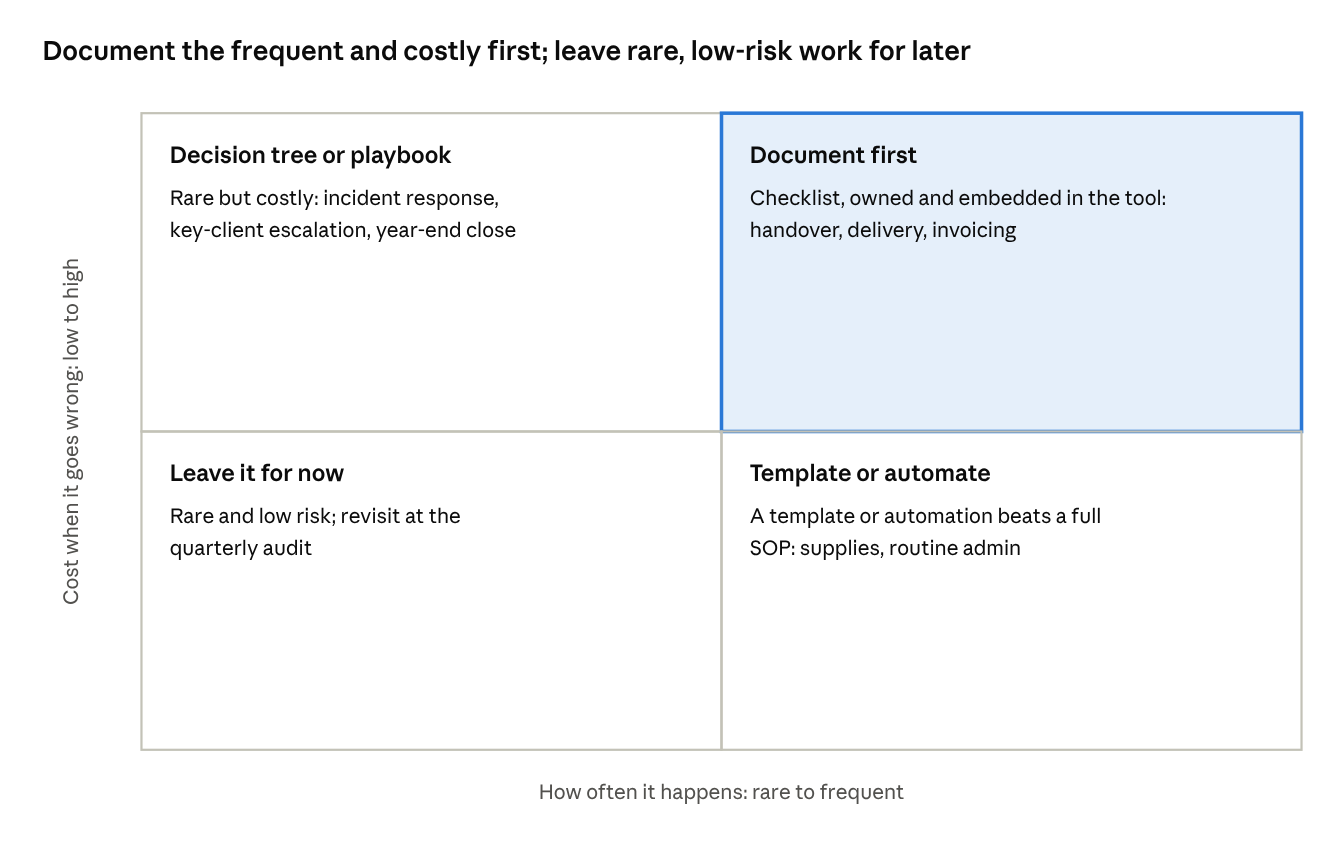
what to document first · frequency × consequence
The top-right quadrant is your first wave; a single-person task anywhere on the grid moves up a tier.
Scoring your list
List your workflows in a spreadsheet. Score each from 1 to 5 on frequency and consequence, multiply the two, and add 5 points if only one person can do it. Sort by total. The top five are your first wave.
| Workflow (example) | Frequency (1–5) | Consequence (1–5) | Single person? | Score |
|---|---|---|---|---|
| Sales-to-delivery handover | 4 | 5 | Yes (+5) | 25 |
| Month-end invoicing | 3 | 5 | Yes (+5) | 20 |
| Client onboarding call | 4 | 4 | No | 16 |
| Weekly reporting pack | 4 | 3 | No | 12 |
| Office supplies ordering | 3 | 1 | No | 3 |
Don’t confuse “important” with “documentable”. Strategy, senior hiring decisions and complex negotiations need judgement frameworks, not step-by-step procedures. Document the repeatable parts — the hiring process, the proposal template, the approval thresholds — and leave the judgement to the people you hired for it.
The five formats and when to use each
Choosing the wrong format is the second-biggest killer of adoption after the wrong location; match the format to the kind of thinking the task needs.
A single company template, used for everything, guarantees that most of your SOPs will be the wrong shape. A checklist cannot explain a judgement call. A narrative cannot be followed at speed. Pick the format first, then write.
| Format | Use it for | Examples | Length guide | Common mistake |
|---|---|---|---|---|
| Checklist | Repeatable execution where steps rarely change | Client onboarding, product launch, month-end close, new-starter day one | 5–25 items, one page | Mixing in explanation — put the “why” in a linked narrative |
| Decision tree | Judgement calls that follow rules | Discount approvals, refund requests, escalation, lead qualification | One page, 3–7 decision points | Trees that end in “use your judgement” — every branch needs an outcome |
| Process narrative | Context: why a process exists, who’s involved, how it connects | How we price, how sales hands to delivery, our quality standard | 1–2 pages | Burying steps in prose — link out to the checklist instead |
| Playbook | Multi-step, multi-person campaigns that run over days or weeks | Client renewal campaign, hiring a role, annual planning, incident response | 2–4 pages, built from linked checklists | Writing it as one long document instead of an index of smaller SOPs |
| Video walkthrough | Software and interface tasks where seeing beats reading | Raising an invoice in Xero, building a report in the CRM, setting up a project | 2–5 minutes, with a written summary | No written summary — video can’t be searched or skimmed |
Choosing in 30 seconds
-
Does the person need to understand why, not just what? → Process narrative, with steps linked out.
-
Does the task involve a choice between outcomes based on rules? → Decision tree.
-
Does it happen inside a piece of software? → Video walkthrough plus a short checklist.
-
Does it span several people and several days? → Playbook that links smaller SOPs.
-
Otherwise → Checklist.
Formats combine. The strongest SOP sets are layered: a one-page narrative explains the process, links to the checklist people run, which links to a two-minute video for the tricky software step. Each piece does one job.
Writing SOPs people can follow
Write for the person doing the task on their worst day: tired, interrupted, new to the role, and under time pressure.
If the SOP works for that person, it works for everyone. Most SOPs are written for the author — someone who already knows the process and skips the steps that feel obvious.
The anatomy of a usable SOP
Every SOP, whatever its format, carries the same seven elements at the top or bottom:
| Element | What it answers | Example |
|---|---|---|
| Title | What task is this? Start with a verb | “Hand a signed client over to delivery” |
| Purpose | Why it matters, in one sentence | “So the client hears the same promise from delivery that they heard from sales” |
| Trigger | When do I start? | “When a deal is marked Closed Won in the CRM” |
| Owner | Who keeps this accurate? | A named person, not a team |
| Steps | What do I do, in order? | Numbered, one action each |
| Definition of done | How do I know I’ve finished correctly? | “Kickoff call booked and client has received the welcome pack” |
| Last reviewed | Can I trust it? | A date, with the next review date |
Seven writing rules
-
One action per step. “Open the CRM and update the deal” is two steps.
-
Start every step with a verb. Open, check, send, record, confirm.
-
Name the exact thing. Not “the template” but “the Kickoff Agenda template in the Delivery folder”, with a link.
-
Show the interface. Add a screenshot wherever the person has to find something on screen.
-
Flag the traps. Mark the steps where people usually go wrong with a short warning.
-
Two pages maximum. Past that, split it into smaller SOPs and link them from a playbook.
-
Test it before you publish. Hand it to someone who has never done the task. Watch them, without helping. Every question they ask is a gap in the document.
Before and after
Before (typical first draft):
When a new client signs, make sure delivery knows about it and has everything they need from sales. The account manager should set up the kickoff and make sure the client is happy with the next steps.
After:
-
Within 24 hours of Closed Won, complete the Handover Form in the CRM deal record.
-
Attach the signed proposal and the scope summary to the form.
-
Tag the delivery lead in the deal and assign them the task “Review handover”.
-
Book a 30-minute internal handover call within 2 working days.
Done when: the delivery lead has marked “Review handover” complete and the kickoff is booked.
The first version describes an intention. The second describes behaviour — and can be checked.
Worked example: the sales-to-delivery handover
This is what a finished SOP looks like — the handover is the single workflow where growing service businesses most often lose margin and client trust.
When sales promises something delivery didn’t hear, the client experiences it as a broken promise in the first week of the relationship. Use this example as a pattern; adapt the steps, tools and timings to your business.
SOP: Hand a signed client over to delivery
| Field | Detail |
|---|---|
| Format | Checklist, with a linked process narrative |
| Purpose | The client hears the same promise from delivery that they heard from sales |
| Trigger | Deal marked Closed Won in the CRM |
| Owner | Head of Delivery (approves); Account Executive (runs it) |
| Time to complete | About 45 minutes across 2 working days |
| Last reviewed / next review | [date] / [date + 90 days] |
Part A — Account Executive, within 24 hours of Closed Won
Trap: verbal promises are the most common source of first-month disputes. If it was said on a call, it goes in the form.
Part B — Delivery Lead, within 2 working days
Definition of done: the handover task is complete, the kickoff is booked, and the client has received the welcome email — all within 3 working days of Closed Won.
If something is undeliverable: the Delivery Lead escalates to the Head of Delivery the same day. The Account Executive does not contact the client about scope changes until that conversation has happened.
Why this example works: it has a trigger anyone can see in the system, one action per line, named templates, a clearly marked trap, a time limit, an escalation route, and a definition of done a manager can check in ten seconds.
Where SOPs live
An SOP more than one click from the task it describes will not be used; put documentation where the work is triggered, not where documents are stored.
The question is not “which tool should hold our SOPs?” It is “where is the person standing when they need this?” The answer is usually the CRM, the project management tool, the helpdesk or the finance system — not a documentation platform.
The two-layer model
| Layer | Purpose | Where it sits | Who uses it |
|---|---|---|---|
| The library | One home for every SOP; the master version, owners and review dates | A single wiki or knowledge base | Owners, managers, new starters during onboarding |
| The trigger points | A direct link to the right SOP at the moment it’s needed | Inside the work tools: task templates, CRM stages, ticket macros, project checklists | Everyone, every day |
The library is the source of truth. The trigger points are where adoption actually happens. Most failed SOP projects build the library and skip the trigger points.
Practical embedding patterns
-
Project and task tools (such as Monday.com, Asana or ClickUp): build the checklist into a task template, so every new project starts with the SOP’s steps already assigned.
-
CRM (such as HubSpot or Pipedrive): link the SOP from each deal stage, or make required fields enforce the key steps.
-
Helpdesk: link the relevant SOP inside saved replies and ticket categories.
-
Recurring meetings: link the reporting SOP in the calendar invite for the meeting it supports.
-
Software tasks: record a short screen walkthrough and link it from the step where people get stuck.
Choosing the library tool
The best tool is the one your team already opens every day. For most $1M–$20M businesses, a well-organised wiki in your existing workspace beats a new specialist platform, because it removes one more login. Move to a dedicated training or SOP platform only when you need features you can’t get otherwise — for example, tracking who has read and acknowledged each document for compliance.
Rule of thumb: if introducing the tool needs its own adoption project, it is the wrong first step.
Ownership and governance
Every SOP needs exactly one named owner — not a team, not a department — with the authority to change it and the duty to review it.
Shared ownership is no ownership. When “Operations” owns a document, nobody updates it when the process changes, and within months the team learns to distrust it.
What an owner does
-
Keeps the SOP accurate whenever the process, tool or team changes.
-
Approves edits suggested by the people who use it.
-
Runs the quarterly review and records the date.
-
Retires the SOP when the process no longer exists.
The owner is usually the person who manages the work, not the person who does it. The person who does the work writes and suggests changes; the owner decides.
Roles across the programme
| Role | Accountable for | Typical time |
|---|---|---|
| Executive sponsor (CEO or COO) | Funding, priorities, enforcing use | 30 minutes a week |
| Programme lead (operations lead) | The library structure, standards, audit calendar, reporting | 2–4 hours a week in setup; 1–2 after |
| SOP owner | Accuracy and review of their documents | 1–2 hours a month |
| Author (person doing the task) | First draft and suggested changes | As needed |
| User (everyone) | Following the SOP and flagging gaps | Continuous |
Version control, kept simple
You don’t need a document management system. You need three habits:
-
One master copy. No local versions, no attachments in email. Everything links to the library.
-
A change line at the bottom. Date, what changed, who approved it. One line per change.
-
Visible review dates. Every SOP shows its last and next review date at the top. Anything overdue is flagged in the monthly report.
Watch for the owner who leaves. When an owner changes role or leaves, reassigning their SOPs is part of the exit checklist. Orphaned documents are how libraries start to rot.
The embed-and-audit loop
Documentation becomes real through three mechanisms running together — onboarding, the weekly rhythm and a quarterly audit; without the loop, the library rots within a quarter.
Each mechanism catches a different kind of decay. Onboarding catches SOPs that are unclear. The weekly rhythm catches SOPs that are wrong. The quarterly audit catches SOPs that are out of date or no longer needed.
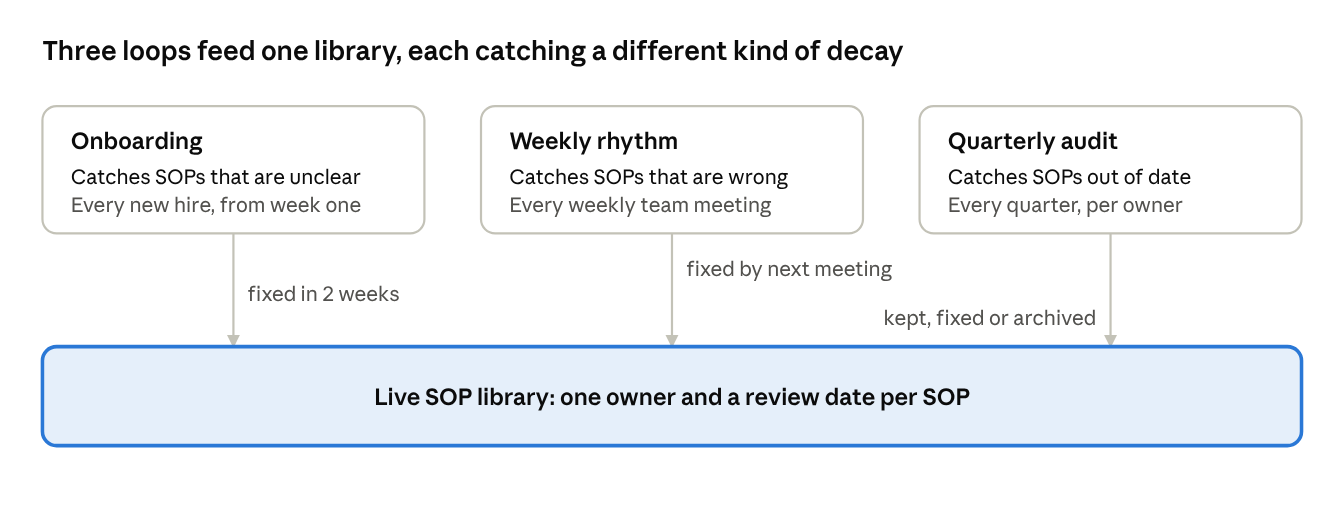
embed-and-audit loop · 3 mechanisms, 1 library
Remove any one loop and that kind of decay goes uncaught.
1. Onboarding: the stress test
New starters are your best testers, because they don’t know the shortcuts. Train them from the SOPs, not around them.
-
Give every new hire a list of the SOPs for their role in week one.
-
Ask them to complete core tasks using the document first, then check with their manager.
-
Ask them to log every point where the SOP was unclear, missing or wrong.
-
The SOP owner fixes those gaps within two weeks.
This turns every hire into an improvement cycle — and gives the new person a fast way to contribute.
2. The weekly rhythm: fix it this week
Add one standing question to your weekly leadership or team meeting: “Did anything go wrong this week that a missing or wrong SOP caused?”
-
Trace each recurring problem to its root: no SOP, wrong SOP, or SOP not followed.
-
No SOP or wrong SOP → assign the owner to fix it before next week’s meeting.
-
SOP not followed → a management conversation, not a documentation one.
If you run EOS or a similar operating system, this fits naturally into the Issues list. Recurring issues are usually a process problem wearing a people costume.
3. The quarterly audit: keep or kill
Once a quarter, each owner reviews their SOPs against four questions:
-
Is it still accurate? (Walk through it against how the work is done today.)
-
Is it being used? (Ask the people who do the task.)
-
Is it in the right place? (Is it linked where the work happens?)
-
Is it still needed? (Archive anything that describes a process you’ve stopped.)
The programme lead reports the results: SOPs reviewed, updated, archived and overdue. Overdue reviews go to the executive sponsor.
Deleting is a success. A smaller, accurate library is healthier than a large, partly wrong one.
Adoption mechanics: what makes SOPs stick
People follow SOPs when their managers do; adoption is driven by five manager behaviours, not by the quality of the documents.
A perfect SOP that managers bypass will be ignored within a month. An average SOP that managers consistently point to will improve and become standard. The behaviours below are what separate the two.
The five manager behaviours
| Behaviour | What it sounds like | Why it works |
|---|---|---|
| Point before you answer | “What does the SOP say?” | Teaches people to look first; reveals gaps when the answer isn’t there |
| Fix, don’t work around | “That step’s wrong — let’s update it now” | Shows the document is alive and worth trusting |
| Review against the SOP | “Walk me through it against the checklist” | Makes the SOP the standard for quality, not the manager’s memory |
| Credit improvements | “Thanks for fixing the invoicing SOP — that saved us a week” | Rewards the behaviour you want repeated |
| Follow it yourself | Managers and the CEO use the same SOPs | Removes the sense that documentation is only for junior staff |
Make the right way the easy way
Behaviour is shaped more by friction than by instruction. Wherever you can, design the process so that following the SOP is easier than skipping it:
-
Build the checklist into the task template, so it’s already there.
-
Make key steps required fields in the CRM, so the record can’t move forward without them.
-
Use templates for emails, proposals and reports, so the standard version is the fastest version.
The CEO’s role in adoption
In practice, the strongest signal of whether adoption will hold is whether the CEO enforces it. When an avoidable problem reaches your desk, your first question should be “Is there an SOP for this, and was it followed?” — not “Let me sort it.” Every time you solve it yourself, you teach the business that the real process is to ask you.
This is uncomfortable for many owner-led businesses, because solving problems is how the CEO built the company. It is also exactly the habit that caps the company’s growth at the CEO’s personal capacity.
Your first five SOPs
Start with the workflows where a single absence or mistake hurts most; for most businesses in the $1M–$20M range, these five deliver the fastest return.
Use your own prioritisation score if it points elsewhere. But if you’re starting from zero, these five cover the points where revenue, client trust and team capacity most often leak.
| # | SOP | Best format | Why it’s first | Typical owner |
|---|---|---|---|---|
| 1 | Sales-to-delivery handover | Checklist + narrative | Broken promises in week one cost renewals and referrals | Head of Delivery |
| 2 | Core delivery workflow | Playbook linking checklists | Consistent quality is what clients actually pay for | Head of Delivery or Operations |
| 3 | Client communication standards | Narrative + templates | Response times, tone and escalation define the client experience | Account Management lead |
| 4 | New-starter onboarding | Playbook (first 30 days) | Every hire stress-tests the rest of the library | Operations or HR lead |
| 5 | Weekly reporting pack | Checklist + video | Leaders can’t manage what they don’t see consistently | Finance or Operations lead |
What “done” means for each
Each of the five is complete only when all of these are true:
Resist the urge to do more. Five SOPs in daily use will change how your business runs. Fifteen half-finished ones will not. Expand only once the first five pass the checklist above.
The 90-day rollout plan
In 90 days you can move from tribal knowledge to five live, owned SOPs and a running review loop — if you sequence it in four phases and don’t skip the gates.
Each phase ends with a gate: a short check the executive sponsor signs off before the next phase starts. Gates stop the most common failure — writing lots of documents before anyone has agreed who owns them.
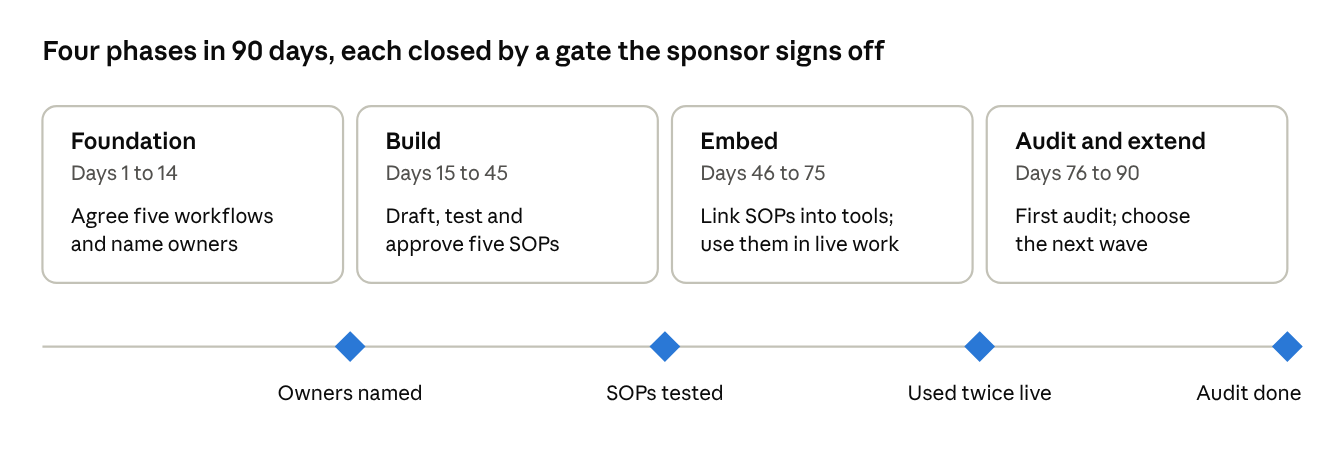
90-day rollout · 4 phases, 4 gates
No phase starts until the gate before it is signed off.
Phase 1 — Foundation (days 1–14)
-
Name the executive sponsor and programme lead.
-
Run the diagnostic with the leadership team.
-
List and score your workflows; agree the first five.
-
Name an owner for each of the five.
-
Choose the library location and agree the SOP template.
Gate: five workflows agreed, five owners named and briefed.
Phase 2 — Build (days 15–45)
-
Authors draft each SOP in the right format, using the template.
-
Owners approve the drafts.
-
Each SOP is tested by someone unfamiliar with the task; gaps are fixed.
-
Add the standing SOP question to the weekly meeting.
Gate: five SOPs tested and approved.
Phase 3 — Embed (days 46–75)
-
Link every SOP from the tool where the work is triggered.
-
Build checklists into task templates and CRM stages where possible.
-
Managers adopt the five behaviours; the sponsor models them.
-
Train the next new starter from the SOPs and capture their feedback.
Gate: all five SOPs used in live work at least twice.
Phase 4 — Audit and extend (days 76–90)
-
Run the first quarterly-style audit on the five.
-
Report results to the leadership team: used, updated, gaps.
-
Re-score the workflow list and choose the next wave.
-
Set the quarterly audit dates for the next year.
Gate: audit complete; next wave agreed; review calendar set.
Measuring it
Track whether SOPs are being kept alive (leading indicators) and whether the business is getting better because of them (lagging indicators); counting documents measures neither.
The number of SOPs in your library is a vanity metric. A business with 200 documents and no reviews is in worse shape than one with 12 that are used daily.
Leading indicators: is the system healthy?
Review monthly. These tell you early whether the loop is working.
| Indicator | How to measure | Healthy sign |
|---|---|---|
| Reviews on time | % of SOPs reviewed by their due date | Above 90% |
| Owner coverage | % of SOPs with a named, current owner | 100% |
| Embedded | % of SOPs linked from the tool where work is triggered | Rising each quarter |
| Gaps raised and closed | SOP issues raised in weekly meetings, and % fixed within a week | Issues raised steadily; most closed within the week |
| New-starter feedback | Gaps logged per new hire | Falling over time |
Lagging indicators: is the business better?
Review quarterly against a baseline you record before you start. Pick the three that matter most to you.
| Indicator | What it tells you |
|---|---|
| Time to productivity for new hires | Whether onboarding from SOPs works |
| Escalations to the CEO or senior team | Whether decisions are moving down the organisation |
| Rework, errors and write-offs | Whether quality is becoming consistent |
| Client complaints in the first 90 days | Whether the handover and delivery SOPs are holding |
| Leadership hours on firefighting | Whether leaders are getting time back |
Take your baseline now. Most businesses skip this and then can’t show the board, or themselves, what changed. A rough baseline — even a one-week log — beats a precise number you never captured.
Who does what
The CEO sponsors and enforces, managers drive adoption, owners keep documents accurate, and the people doing the work write them — confuse these roles and the programme stalls.
The most common mistake in owner-led businesses is the CEO writing the SOPs. It feels efficient, because the CEO knows the most. But it produces documents that describe how the work should be done, not how it is done, and it keeps the CEO at the centre of the system you’re trying to build around them.
| Activity | CEO | Programme lead | Managers | SOP owners | Team |
|---|---|---|---|---|---|
| Decide priorities and fund the programme | Decides | Recommends | Input | — | — |
| Name owners | Approves | Proposes | Input | — | — |
| Set the template and standards | Approves | Owns | Input | Input | — |
| Draft SOPs | — | Supports | — | Reviews | Writes |
| Approve SOPs | — | Checks standard | — | Approves | — |
| Embed SOPs in tools | — | Coordinates | Implements | Input | — |
| Enforce use | Models | Reports | Enforces | — | Follows |
| Weekly gap review | Chairs (leadership) | Tracks | Runs (team) | Fixes | Raises |
| Quarterly audit | Reviews report | Runs | Input | Reviews own SOPs | Input |
What we ask of the CEO, in practice
-
Approve the first five workflows and their owners in the first two weeks.
-
Protect the programme lead’s time for the 90 days.
-
Ask “what does the SOP say?” every time an avoidable problem reaches you.
-
Review the monthly health report in the leadership meeting.
-
Use the SOPs yourself — including the ones that constrain you.
Objections you’ll hear — and how to answer them
Resistance to documentation is predictable; prepare your answers before you launch, and most objections dissolve within the first month of use.
| You’ll hear | What’s usually behind it | How to answer |
|---|---|---|
| “We’re too busy to write things down.” | Writing feels like extra work on top of the real work | “We’re too busy not to. We’ll start with five, and each one should save more time than it takes within a month.” |
| “Every client is different.” | Fear that SOPs will make the work rigid | “The judgement stays with you. We’re documenting the 80% that’s the same every time, so you have more time for the 20% that isn’t.” |
| “It’ll be out of date in a month.” | Past experience of a dead library | “That’s why every SOP has an owner and a review date. Out of date means it gets fixed, not ignored.” |
| “I don’t want to make myself replaceable.” | Job security, often unspoken | “Documenting what you do makes you promotable, not replaceable. People who can’t hand work off can’t move up.” |
| “The CEO doesn’t follow process, so why should I?” | A real inconsistency | Fix it at the top. The CEO uses the same SOPs and says so publicly. |
| “We tried this before and it didn’t work.” | A genuine history of failure | “It did fail — here’s why (wrong location, no owners). This time we’re fixing those first and starting with five, not fifty.” |
Listen for the fear under the objection. The most stubborn resistance usually comes from your most experienced people — whose knowledge is exactly what you need to capture. Involve them as authors and owners. Recognise their expertise publicly. People rarely resist a system they helped build.
Where this usually breaks — and when to bring in help
The method in this guide is simple; the hard part is holding the line for 90 days while the business keeps running at full speed.
Most SOP programmes don’t fail at the writing stage. They fail in weeks four to eight, when the first enthusiasm fades and day-to-day pressure takes over. Watch for these warning signs:
-
The programme lead’s time gets taken back. Documentation always loses to the urgent. Without protected time, the work stops quietly.
-
Owners approve without testing. SOPs go live untested, fail in use, and the team stops trusting them.
-
The CEO keeps solving problems directly. The team learns the real process is still “ask the boss.”
-
Embedding is skipped. The library exists, but nothing links to it from where the work happens.
-
The first audit doesn’t happen. Once one quarter slips, the next one usually does too.
Signs you need outside support
Doing this internally works well when you have an operations lead with the time and authority to drive it. Consider outside support when:
-
Nobody in the business has both the capacity and the authority to lead it.
-
You’ve tried before and it stalled at the same point.
-
The processes that most need documenting run through the CEO.
-
You’re preparing for growth, investment or a sale, and need the operating system in place on a deadline.
-
Documentation is one symptom of a wider issue — unclear roles, no meeting rhythm, decisions bottlenecked at the top.
How Markinly helps
Markinly provides fractional COO leadership to CEOs and business owners of growing companies in the UK, US and Europe. We don’t hand you a folder of documents. We embed with your leadership team, build the operating rhythm that keeps processes alive, and transfer ownership to your people so the system runs without us.
If this guide has surfaced more than you expected, that’s normal. Book a 30-minute conversation at markinly.com. We’ll look at where your operations are today and tell you honestly whether you need help, or whether this playbook is enough.
Appendix: templates you can use today
Copy these three templates into your library tool to skip the blank page.
A. The SOP template
# [Verb] + [task] (e.g. “Raise a client invoice”)
Format: Checklist | Decision tree | Narrative | Playbook | Video
Purpose: [One sentence: why this matters]
Trigger: [The event that starts this task]
Owner: [Named person]
Time to complete: [Estimate]
Last reviewed: [Date] Next review: [Date + 90 days]
## Before you start
- [Access, tools or information needed]
## Steps
- [Verb] …
- [Verb] …
WARNING: [Common mistake at this step] - [Verb] …
## Definition of done
[What is true when the task is complete and correct]
## If something goes wrong
[Who to escalate to, and when]
## Change log
[Date] – [What changed] – [Approved by]
B. The quarterly audit checklist
For each SOP the owner reviews:
The programme lead then records totals: reviewed, updated, archived, overdue.
C. The SOP owner charter
Share this with every new owner so the role is explicit.
As the owner of this SOP, I am accountable for:
-
Keeping it accurate whenever the process, tool or team changes.
-
Reviewing and approving changes suggested by the people who use it.
-
Fixing gaps raised in the weekly meeting before the next meeting.
-
Completing the quarterly review on time.
-
Handing ownership over formally if I change role or leave.
The SOP Playbook is published by Markinly International Management. You’re welcome to adapt these templates for use inside your own business.
Put this to work
The fastest way to apply it to your business: a free 60-minute Ops Diagnostic.
Get the guide
Related resources
 Template
SMB Process Audit Checklist
Find your biggest operational bottleneck in under an hour — the same first-week audit Gideon runs inside every client engagement.
 Template
SOP Template Pack (5 Formats)
Coming soon. This template pack is being finalised — leave your email on the page and we'll tell you when it's ready.
 Template
KPI Tracking Spreadsheet for SMBs
Coming soon. This spreadsheet is being finalised — leave your email on the page and we'll tell you when it's ready.
Recently viewed
Reading is good. A diagnosis is better.
Start where every client starts: the free 60-minute Ops Diagnostic.